

Designer Plugins
Overview
The Designer Plugin system provides a flexible framework that allows users to create HTML frontends that interact seamlessly with the Designer software. With this system, developers can extend the core functionality of Designer by integrating customised workflows, real-time data visualisation, and interactive controls. Plugins are powered by Python scripts that execute within a controlled environment, enabling communication between Designer and external services or devices. This integration empowers developers to enhance the user experience and add unique features to their projects.
Browser Engine
Plugin HTML interfaces are accessible in any browser (locally or on another machine), supporting modern web standards and JavaScript frameworks. When launched inside Designer, they utilise the embedded Chromium Embedded Framework (CEF) browser engine to render. The specific CEF version used by Designer is determined by the Designer release version and provides compatibility with contemporary web development practices. For detailed information about Chromium versions and feature support, see the Chromium Web Integration page.
Plugin Types
Designer plugins can be categorised into two main types:
Local: Plugins found locally in the Plugins folder within the project folder (internal plugins)
Remote: Plugins discovered through DNS-SD (network-based plugins)
For detailed information about how Designer discovers and loads plugins, see the Plugin Configuration page.
Frontend - Backend setup
The plugin architecture follows a frontend-backend separation principle, ensuring that different responsibilities are clearly delineated:
- Frontend Responsibilities: The HTML interface handles user interactions, displays real-time data, and sends commands to the backend. All UI elements and animations should be implemented using JavaScript frameworks such as Vue.js or React.
- Backend Responsibilities: The backend processes data, executes long-running tasks, and provides APIs for communication. This can be implemented in any language, as long as it can exchange data with the frontend effectively.
- Communication Methods: To maintain an interactive experience, data exchange between the frontend and backend can be performed using:
- WebSockets for real-time bi-directional communication.
- Server-Sent Events (SSE) for streaming updates efficiently.
- REST APIs for standard request-response operations.
- MQTT or OSC for low-latency event propagation in specialised use cases.
Control of your own device
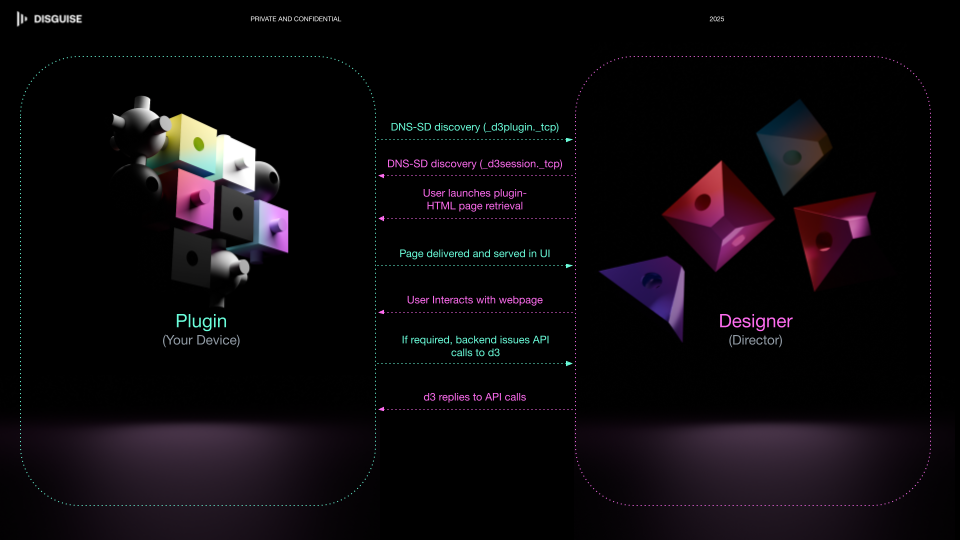
Since plugins are running and hosted outside of Designer, they can use any of the device’s capabilities via APIs. The power of plugins is to link these functions to Designer in a user interface widget that users can interact with as part of their Designer workflow. As imagined, a device manufacturer will design and host their own Designer plugin within their device, publishing it via DNS-SD to Disguise users.
Designer Control
It is envisaged that for the majority of applications, plugins will interface with Designer via the regular API. This provides fully crafted APIs which can be used to control and monitor Designer. Please see working with sessions for more details on how to work with sessions and directors.
Python API
Plugins commonly use the Python API to interact with Designer’s internal objects. The Python API is also available independently of plugins — any HTTP client can execute Python code in a Designer session.
Python designer-plugin
The Python designer-plugin provides programmatic control of Designer from external Python applications. It’s a high-level HTTP wrapper Python API to help write custom plugins in a Pythonic way. The library provides the following features:
- Register plugins so they can be discovered by Designer
- Execute Python methods remotely on Designer
See the Python designer-plugin documentation for details.
Support for Designer Plugins can be found by contacting support@disguise.one for general Disguise support.